1、打开JUPYTER NOTEBOOK,新建一个空白的PY文档。

2、import re。
首先要引入relugar expression模块。

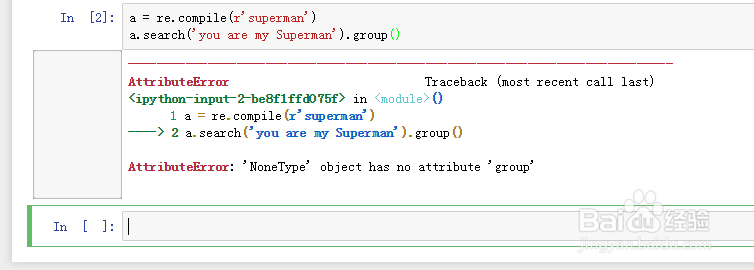
3、a = re.compile(r'superman')
a.search('you are my Superman').group()
这种情况下我们不知道要找到句子里面是否是大小写,所以会出错。
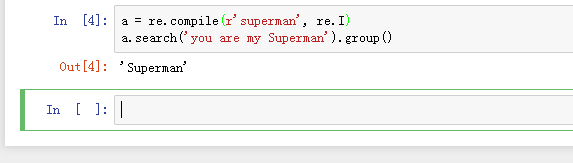
4、a = re.compile(r'superman', re.IGNORECASE)
a.search('you are my Superman').group()
这个时候在后面加 re.IGNORECASE,那么就可以表示大小写都可以匹配。

5、a = re.compile(r'superman', re.I)
a.search('you are my Superman').group()
为了缩短书写,我们可以用re.I来简写,不会出错。
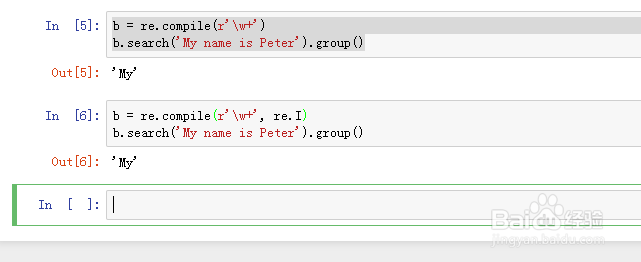
6、b = re.compile(r'\w+')
b.search('My name is Peter').group()
b = re.compile(r'\w+', re.I)
b.search('My name is Peter').group()
\w本来就表示任何的字母,所以这里加re.I就没必要了,结果是一样的。
7、c = re.compile(r'(my){3}')
c.search('mymymyMY').group()
c = re.compile(r'(my){3}', re.I)
c.search('mymymyMY').group()
如果用这种大括号的情况后面加re.I,是不会得到相应结果的。

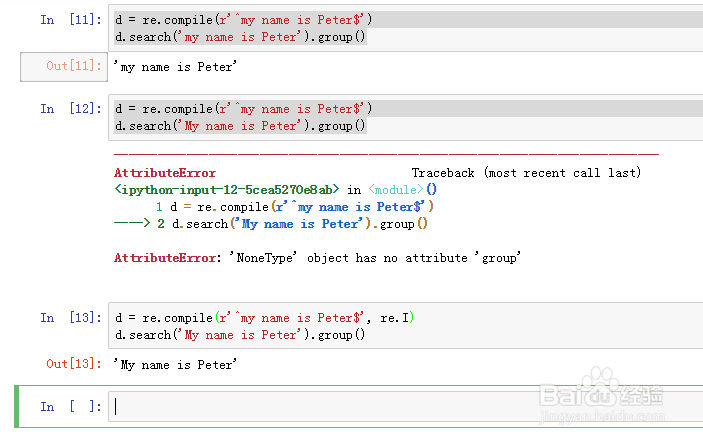
8、d = re.compile(r'^my name is Peter$')
d.search('my name is Peter').group()
d = re.compile(r'^my name is Peter$')
d.search('My name is Peter').group()
d = re.compile(r'^my name is Peter$', re.I)
d.search('My name is Peter').group()
如果在^$的情况下,那么我们可以运用,就可以返回大小写的问题。
9、e = re.compile(r'[aeiou]')
e.search('What is A good product?').group()
e = re.compile(r'[aeiou]')
e.findall('What is A good product?')
e = re.compile(r'[aeiou]', re.I)
e.findall('What is A good product?')
中括号的情况下也是适用这种方法的。
