1、进入SourceInsight,打开任意工程。

2、在上方工具栏中点击的“Options”,然后在菜单中选择“Preferences”。

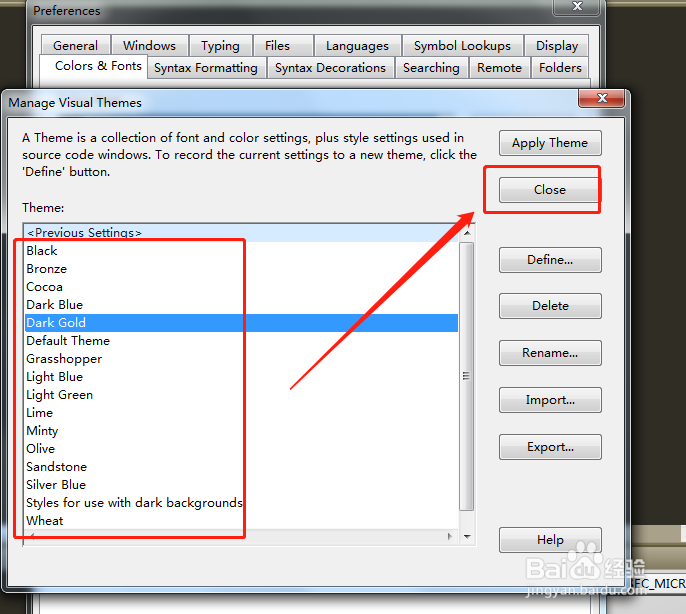
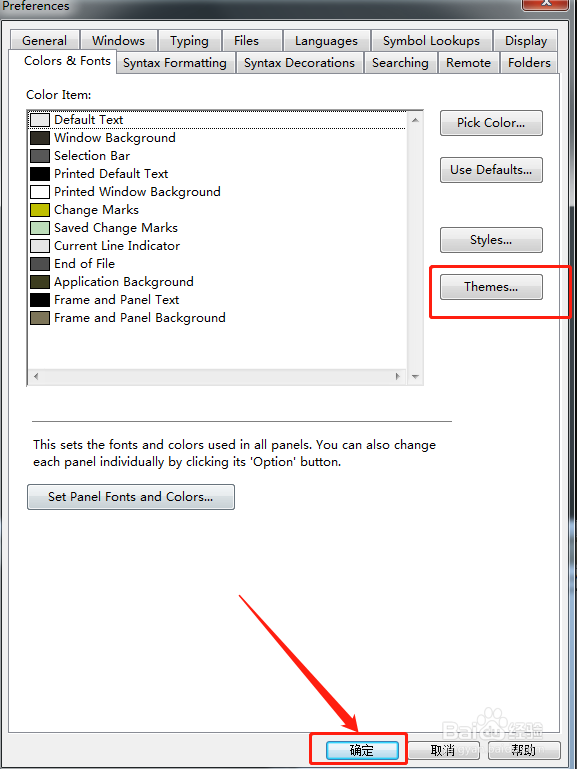
3、在选项卡中,点击"Color&Fonts",然后点击“themes”。

4、从主题中挑选自己喜欢的,然后点击窗口右侧的“close”。
5、主题选择完毕后,点击Preferences窗口下方的“确定”。
6、回到编辑界面,可以看到编辑界面整个已经变成了我们设置的主题风格。SourceInsight编辑界面设置主题完成。

1、1.打开任意工程,进入SourceInsight。
2.点击上方的“Options”,然后在菜单中选择“Preferences”。
3.点击"Color&Fonts",然后点击“themes”。
4.挑选主题,然后点击窗口右侧的“close”。
5.点击Preferences窗口下方的“确定”,SourceInsight编辑界面设置主题完成。