1、 首先下载一款windows installer clean up工具,windows installer clean up是Microsoft 已更新的Windows Installer 清理实用工具;
2、 按照提示一步步安装;
3、 安装完毕,打开软件,选择如下选项(不要选错);
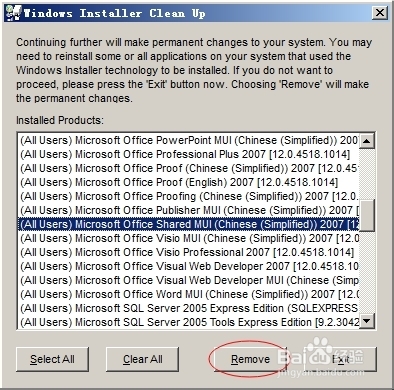
4、 选中如上选项,然后点“Remove”;
5、 删除了以后,就可以关闭这个软件,然后顺利安装Office2007了。
1、 首先下载一款windows installer clean up工具,windows installer clean up是Microsoft 已更新的Windows Installer 清理实用工具;
2、 按照提示一步步安装;
3、 安装完毕,打开软件,选择如下选项(不要选错);
4、 选中如上选项,然后点“Remove”;
5、 删除了以后,就可以关闭这个软件,然后顺利安装Office2007了。